Last updated: October 13, 2026 · Originally published: November 19, 2024
By MEDFAR · Reviewed by Elias Farah
This guide has been revised to clarify LIS workflows, research references, system comparisons, and implementation planning.
A laboratory information system (LIS) is software that manages clinical laboratory work from orders and specimen accessioning to testing, quality checks, result reporting, and billing support. It connects laboratory instruments and healthcare systems, tracks specimens, and records review and release decisions. Capabilities vary by platform, with some functions delivered through integrated modules or external systems.
Clinical labs move fast. Paper does not. Spreadsheets break quietly. When orders, specimens, analyzers, results, and claims start crossing at volume, the lab needs one system to keep the chain intact. That is where an LIS stops feeling like software and starts behaving like infrastructure.
The software layer that keeps a clinical lab moving
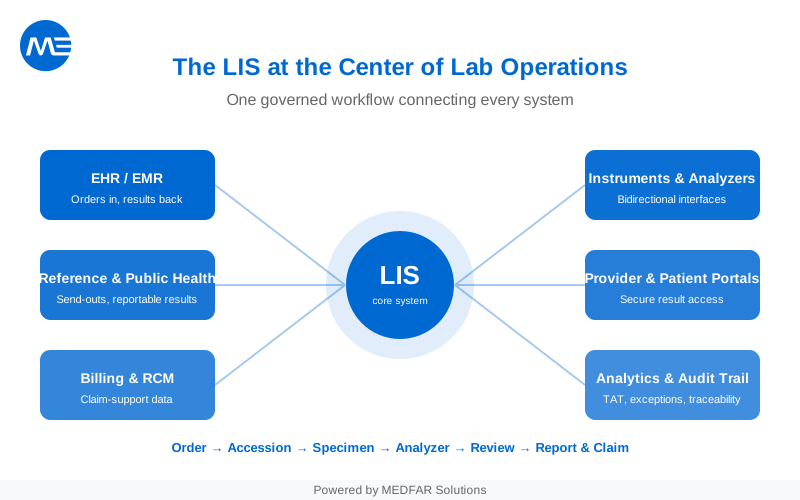
A laboratory information system sits at the center of the clinical testing workflow. It helps the lab receive orders, accession specimens, route work to analyzers, review results, publish reports, and preserve the audit history that leadership, clinicians, billing teams, and inspectors all depend on.
That control layer matters because regulatory frameworks such as the CMS CLIA program and the broader 42 CFR Part 493 laboratory requirements define quality expectations for laboratories that test human specimens. The quality system requirements for nonwaived testing explicitly span preanalytic, analytic, and postanalytic phases, and they require specimen identification, monitoring, and corrective action across the full testing process.
CLIA sets requirements for laboratory processes and reliable result reporting. It does not require a laboratory to purchase an LIS: its reporting rules apply to manual and electronic systems. An LIS can help a laboratory carry out and document its procedures, but software alone does not establish compliance.
That is why an LIS is more than a database. It is the operating layer that helps a lab prove what happened, when it happened, and who handled it.
In healthcare, LIS stands for laboratory information system. Its purpose is to connect patient information with specimen handling and test results throughout the clinical laboratory workflow.
A good LIS should help a lab do five things well:
- keep specimen identity intact from receipt through release
- capture and govern analyzer data without retyping
- route exceptions to the right reviewer at the right time
- return results to the right destination in the right format
- support billing, reconciliation, and audit readiness without forcing staff into side spreadsheets

Manual workflows break in predictable places
Manual work does not fail all at once. It fails in fragments. A label gets rewritten. A result waits in a queue no one owns. A billing detail never makes it from the lab to the claim.
Research supports evaluating specific connected workflows, rather than assuming every LIS implementation produces the same result. The following studies illustrate benefits and tradeoffs in hospital settings; they are not comparisons of current LIS products or guarantees of LABGEN performance.
In a 2006 controlled before-and-after study by Westbrook and colleagues, computerized pathology order entry reduced average laboratory turnaround time by 15.5 minutes per assay in the intervention wards of a teaching hospital. The intervention was computerized order entry, rather than a comparison of LIS platforms.
In a 2017 study by Petrides and colleagues at Brigham and Women’s Hospital, connecting the EHR and LIS improved selected turnaround measures and reduced preanalytic phlebotomy errors. The study also found increased add-on requests and problems with some test codes. These findings make workflow design, validation, and monitoring central to a fair evaluation.
In practice, labs feel the pressure in four places first:
- speed: manual entry and duplicate review slow the path from order to released result
- visibility: staff cannot see specimen location or exception status without calling, emailing, or checking a side log
- communication: providers and patients wait longer when results depend on manual formatting or forwarding
- reimbursement: claim support weakens when coding, demographics, and order context live in separate tools
An LIS does not remove complexity from laboratory work. It makes that complexity governable.
The workflow runs end to end
The easiest way to understand an LIS is to follow one specimen from order to outcome.
Order received → Accession assigned → Specimen checked in → Work sent to analyzer → Result reviewed → Report delivered and claim supported
1. Order intake and accessioning
The workflow starts when an order arrives from an EHR, provider portal, outreach client, or internal entry screen. The LIS maps that order to the lab’s catalog, creates the accession, and ties the record to the right patient, test, provider, and specimen requirements.
2. Specimen receipt and identity control
When the sample reaches the lab, staff verify identity, label integrity, collection details, and receipt time. This is where chain-of-custody discipline begins, and where weak manual workflows usually surface first.
3. Analyzer routing and worklists
The LIS sends the right work to the right analyzer or bench. In more mature environments, it also supports bidirectional interfaces so instruments can receive worklists and return results without repeated manual entry.
4. Quality checks and result review
A usable LIS does not just store values. It applies rules. That includes flags, delta checks, reflex logic, QC review, critical value handling, and escalation paths for pathologists, supervisors, or designated clinical staff.
5. Reporting and result delivery
Once the result is verified, the LIS formats and sends it where it belongs: back to the ordering system, into a provider portal, through a patient-facing workflow, or into a downstream reporting channel.
6. Billing support and audit traceability
The operational job is not finished at release. The lab still needs a reliable record for coding, claim support, reconciliation, and future review. Even when billing is handled in a connected system, the LIS should preserve the data trail that supports reimbursement and dispute resolution.
When these steps live in separate tools, each handoff becomes a risk point. When they live in one governed workflow, the lab gains speed, traceability, and fewer silent failures.
Core modules shape day-to-day performance
Feature lists can sound impressive. Module design is what actually determines whether the platform will fit your lab.
| Module | What it covers | What to verify before you buy |
|---|---|---|
| Order management | requisitions, accessioning, test catalog mapping, reflex logic | Can the system support your ordering patterns without custom workarounds? |
| Specimen tracking | barcode workflows, status changes, storage locations, chain-of-custody detail | Can staff see where a specimen is, who touched it, and what happened next? |
| Instrument interfaces | bidirectional worklists, result capture, exception handling | Are your analyzers already supported in production, or are you funding a first-time build? |
| Quality control and review | flags, rule sets, delta checks, critical values, release controls | Can supervisors configure rules quickly, and can the system document overrides cleanly? |
| Reporting and portals | provider reports, patient access, outreach views, notifications | Can each audience receive only what it should, in the format it expects? |
| Billing and revenue cycle support | claim-support data, edits, denials, patient statements, reconciliation workflows | Is billing native, tightly integrated, or pushed into a separate product with a fragile handoff? |
| Analytics and audit history | turnaround time, volume, bottlenecks, exceptions, user actions | Can leadership answer operational questions without asking someone to export data manually? |
The right question is not “does the system have this module?” The right question is “how native is it, how configurable is it, and who owns it when something breaks?”
That distinction matters most around billing, portals, and interfaces. These are the places where a platform can look unified in a demo but fragment under real workflow pressure.
Need a practical planning asset before you shortlist vendors? MEDFAR’s The Ultimate Guide to Scaling Your Lab is a useful next read for operations leaders, IT teams, and growing labs.
Integration is where good LIS projects succeed or stall
Integration sounds simple on slides. It rarely is in live lab operations.
Most labs need the LIS to exchange data with multiple external systems. That includes EHRs, analyzers, clearinghouses, portals, public health destinations, and reference labs. Newer interoperability work increasingly uses HL7 FHIR, which ONC describes as a commonly used standard for exchanging health information. At the same time, ONC certification materials for reportable laboratory workflows still reference HL7 Version 2.5.1 for electronic laboratory reporting. Real labs usually live in both worlds at once.
A strong LIS integration strategy should cover four layers:
- Ordering systems: receive orders, demographics, diagnosis data, and return results without duplicate entry
- Instruments: support stable interfaces, clear ownership, and visible exception handling
- Billing and clearinghouse workflows: preserve the data required for cleaner claim submission and follow-up
- Public health and send-out workflows: support reportable results, acknowledgments, and referral testing without ad hoc scripts
Ask vendors for a maintained interface library, not a logo slide. You want specifics: which instruments are live, which EHRs are bidirectional, what a new interface usually requires, and who handles monitoring after go-live.
Evaluate the partner behind the interface
Adam El Hosseiny, COO of Access Medical Lab, explains how he evaluates technology partners in his interview with MEDFAR: “Any partner of ours is an extension of our business.” He also points to reliability, quality, and responsive support. For an LIS buyer, turn that perspective into a demo test: if an analyzer interface stops sending results, how is the failure detected, who is alerted, what can staff do while the connection is down, and how is the incident documented?
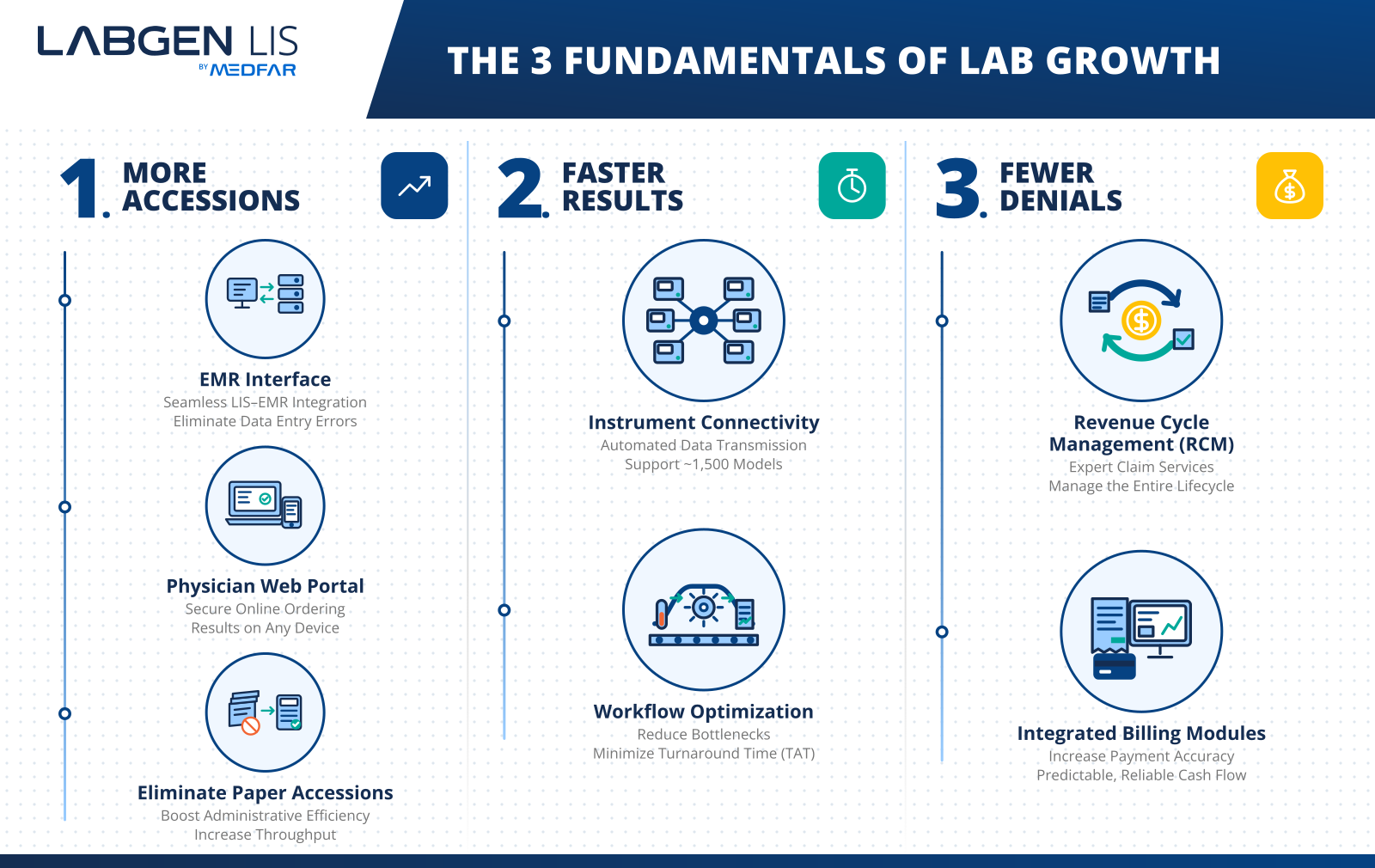
If integration depth is a priority, readers often move next to a product overview such as LABGEN’s LIS page or a more detailed workflow discussion such as LABGEN’s transition and migration overview.
Portals and dashboards change how the lab is experienced
The LIS is not judged only by what happens at the analyzer bench. It is also judged by how easily other people can use the system around the lab.
Providers want clean ordering, fast result access, and fewer calls back to the bench. Patients increasingly expect secure result access without waiting for a paper handoff. Operations leaders need live visibility into turnaround, workload, bottlenecks, denials, and exceptions. Those are not “nice-to-have” layers. They shape adoption, outreach growth, and management confidence.
What responsive service looks like to a lab leader
In MEDFAR’s interview with Alex Alvarez, the founder and CEO of Helix Diagnostix discusses the importance of responding promptly to providers by phone and email. Applied to an LIS evaluation, this raises a practical question: when a result is delayed, can staff see its status, identify who owns the exception, and give the ordering provider a reliable answer? Test that sequence in a demo, including the handoff to a person when a portal cannot resolve the issue.
A strong setup usually includes:
- a provider-facing workflow for order entry, result access, and notifications
- a patient-facing path for secure result access where the lab’s model supports it
- dashboards that show turnaround time, volume, workload, and exception trends
- role-based views so each user sees only the information and actions they need
If those workflows matter to your team, MEDFAR’s LABGEN portals page and the supporting article on which LIS dashboards and KPIs matter most help extend the evaluation beyond the core transaction flow.
LIS, LIMS, and EMR serve different jobs
The terms overlap in conversation. They should not blur during evaluation.
| System | Primary record | Main use case | Typical emphasis |
|---|---|---|---|
| LIS | patient + specimen | clinical diagnostic testing | order-to-result workflow, instrument connectivity, result review, reporting, billing support |
| LIMS | sample + study or batch | research, manufacturing, quality, or regulated non-clinical workflows | method control, study design, batch traceability, inventory, regulated electronic records |
| EMR/EHR | patient encounter | clinical documentation and care delivery | orders, notes, medication history, care plans, and result consumption |
If your lab runs patient-facing clinical testing, the starting point is an LIS. If your environment is research-heavy, batch-driven, or method-versioned, you may need a LIMS instead, especially in workflows shaped by 21 CFR Part 11 electronic records and signatures requirements. If your clinicians document care, they still need an EMR or EHR alongside the laboratory platform.
These categories describe typical workflows, and product capabilities can overlap. Many organizations use more than one system. Evaluate the actual specimen, patient, quality, and reporting requirements instead of relying on the product label alone.
For a deeper side-by-side comparison, MEDFAR already has a dedicated LIS vs LIMS guide.
Clear signals show when your lab needs an LIS or a replacement
Labs rarely outgrow a system all at once. They outgrow it at the seams.
The pressure usually shows up first in handoffs, exceptions, and reporting delays. Staff find themselves building shadow workflows around the platform. A manual fix works for a week. Then it becomes policy by accident.
How do you know your lab has outgrown its current system?
Look for patterns like these:
- orders or results still need to be retyped by staff
- specimen status is hard to verify in real time
- adding a new analyzer or provider system triggers a long custom project
- release queues depend on spreadsheets, email, or side logs
- billing edits live outside the lab workflow
- leadership cannot pull turnaround, exception, or denial data quickly
- multi-site growth exposes weak permissions, visibility, or workflow routing
Not every lab needs the same path forward. A start-up lab has different constraints than an established lab or a physician office lab. The common signal is simpler: when the workflow no longer matches the work, the system becomes drag.
Buyer questions reveal platform maturity
Good demos look smooth. Good selection work looks skeptical.
The point of an evaluation is not to admire screens. It is to expose operational risk before contract signature. That means asking for live proof, not polished claims.
What should you ask vendors in the first demo?
Start with these ten questions:
- Show us one order moving end to end, from intake through released result.
- Which modules are native, which come from partners, and which cost extra?
- Which of our analyzers and ordering systems are already live in production?
- How are QC rules, flags, delta checks, and reflex logic configured?
- How does the system document specimen integrity, user actions, and review history?
- What does implementation look like week by week for a lab our size?
- How do you migrate historical data, and how do you validate it before cutover?
- How are claim edits, denials, and patient-balance workflows handled?
- What uptime reporting, support coverage, and escalation path do you provide?
- What changes when we add a site, a specialty, or a higher outreach volume?
These questions get even sharper when paired with MEDFAR’s existing internal resources: the decision-maker’s guide to choosing an LIS, the pricing and ROI article, and the newer article on how to validate LIS data migration.
Ask for proof, not promises. A real interface list, a real workflow, and a real migration plan reveal more than a polished roadmap ever will.
Cost comes from complexity, not just license fees
Price matters. Fit matters more. Total cost of ownership lives in the space between them.
Most LIS budgets are shaped by test volume, interface count, implementation scope, data migration, billing requirements, portals, analytics, training, and support. Two labs with similar test menus can receive very different proposals because their integration and governance burdens are not the same.
When you review pricing, separate these cost buckets:
- platform subscription or license
- implementation and configuration
- interface build and interface maintenance
- data migration and validation
- training and change management
- optional modules such as portals, analytics, or revenue cycle tools
If a quote hides those categories inside one number, ask for a breakout. Hidden service effort is where timelines stretch and budgets lose clarity.
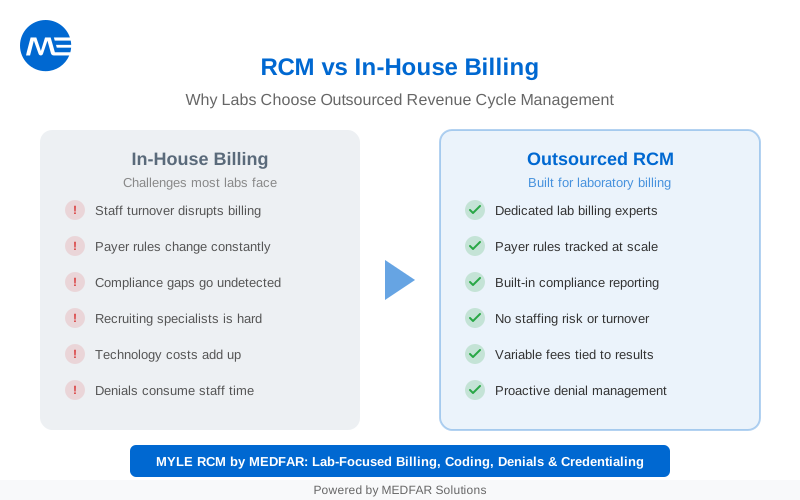
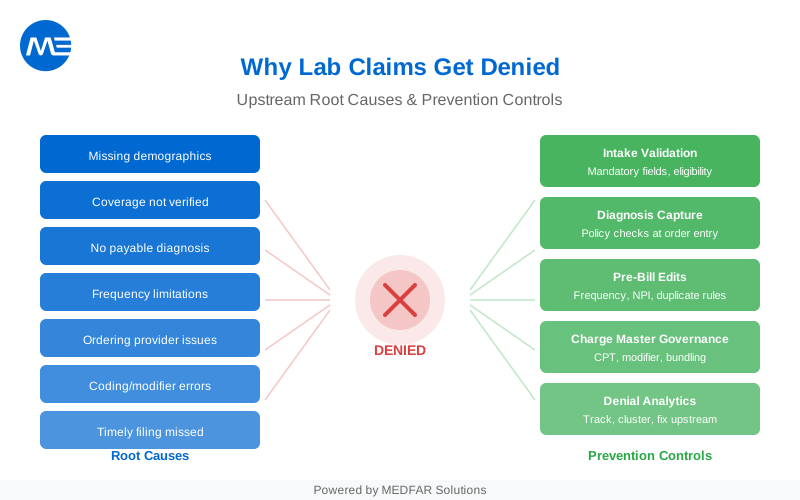
For labs thinking through the commercial side of this decision, MEDFAR’s article on the true ROI of laboratory information systems is the natural next step. Billing-heavy teams may also find value in the related pieces on RCM vs in-house billing and why lab claims get denied.
A strong evaluation ends with a better fit
An LIS does not just hold lab data. It protects specimen identity, supports disciplined review, strengthens interoperability, and gives leaders clearer visibility into performance and reimbursement.
That is the difference between software your staff works around and software your lab grows through.
If you want the next layer of detail, start with LABGEN’s LIS overview, compare LIS vs LIMS, or download The Ultimate Guide to Scaling Your Lab. Those three assets move naturally from explanation to evaluation.
FAQ
What does LIS stand for in healthcare?
LIS is the medical abbreviation for laboratory information system. In healthcare, it refers to the software a clinical laboratory uses to manage orders, specimens, analyzer results, review steps, reporting, and related billing support.
How is an LIS different from an EMR or EHR?
An EMR or EHR supports clinical documentation and patient care at the provider level. An LIS supports the laboratory workflow itself, then sends results back to the ordering system. One manages care records; the other manages testing operations.
Is an LIS the same as a LIMS?
No. An LIS is built for clinical diagnostic testing on patient specimens. A LIMS is usually designed for research, manufacturing, quality, or batch-driven work. Some organizations need both, but they solve different workflow problems.
How long does LIS implementation usually take?
There is no single implementation timeline that applies to every laboratory. The schedule depends on interface scope, data migration, workflow configuration, validation, staff training, and the number of sites. Ask the vendor for a project plan with responsibilities, acceptance criteria, and milestones for testing, training, and go-live, based on your laboratory’s actual requirements.
Can an LIS handle billing, reporting, and patient access?
It can, but the depth varies by platform. Some LIS products include native billing support, provider portals, patient portals, and analytics. Others rely on separate tools and integrations, which can create more handoffs to manage.

REVIEWED BY
Elias Farah · President & CEO, MEDFAR Solutions Cliniques
Last reviewed: September 23, 2026